See your AI inventory
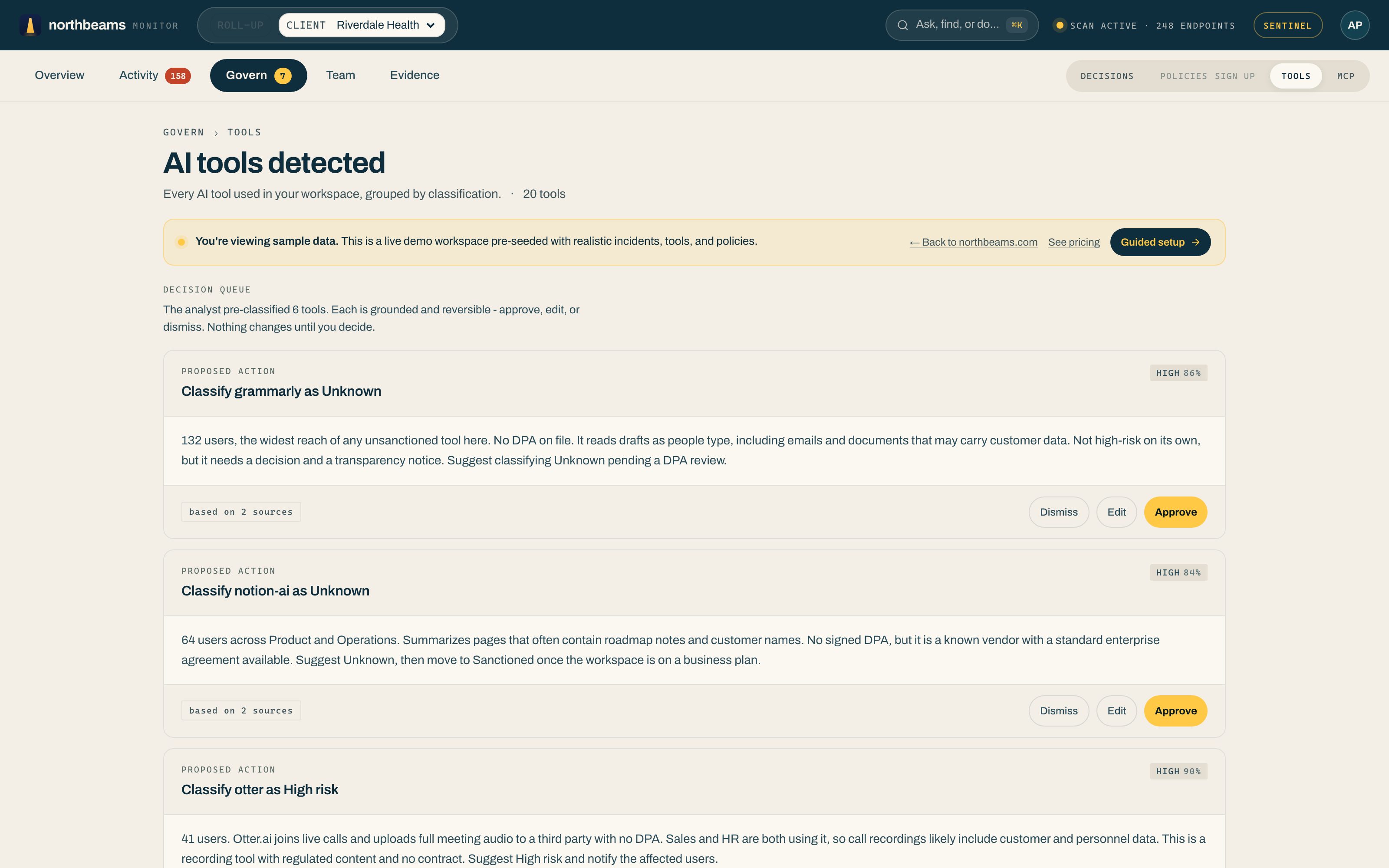
Open Govern, then Tools to see every AI tool Northbeams has detected across all four surfaces: browser, desktop, CLI, and MCP. The page is titled AI tools detected and groups your whole inventory by classification.
Start with the decision queue
At the top, Northbeams pre-classifies the newly-seen tools that need a call and shows them as a decision queue. Each proposal is grounded in the evidence (for example, "132 users, no DPA on file") and reversible: Approve it, Edit the classification, or Dismiss it. Nothing changes until you decide.
What each tool shows
- Risk classification: sanctioned, unknown, or high-risk.
- Distinct users: how many people on your team have used it.
- Event count: how much it is being used.
- First and last seen: when it showed up, and whether it is still active.
New tools appear the day they first show up, so the inventory stays current without you doing anything.
What to do next
From a tool's row you can set its policy. Override the category rule for a single tool when the broad rule is too strict or too loose. See Set policies: allow, warn, block.
To pull the same inventory into a spreadsheet or another system, use the REST API or the MCP connector.