Using Northbeams
Govern MCP tools with the Gateway
Last updated 2026-07-13
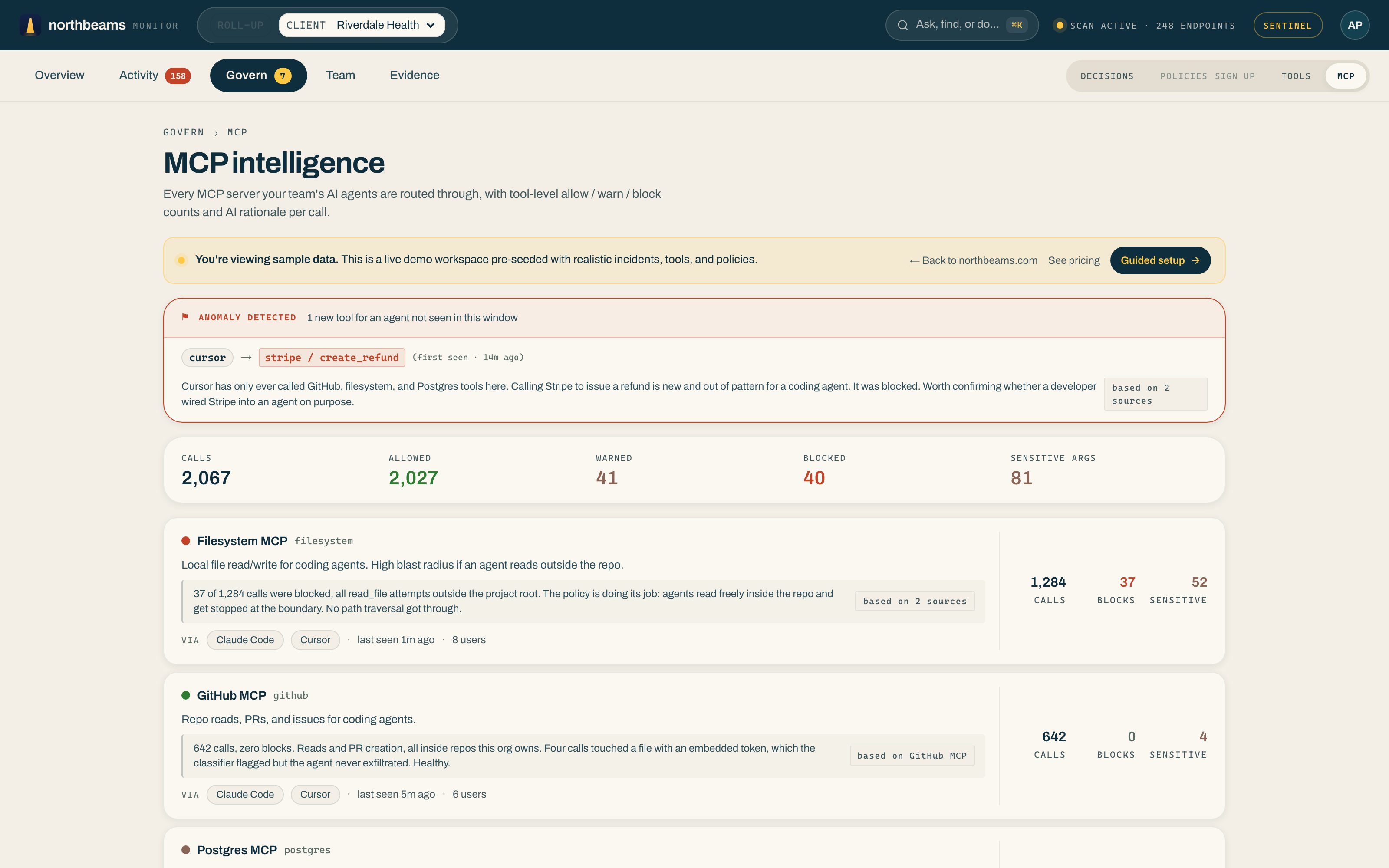
The MCP Gateway sits in the path between your coding agents (Claude Desktop, Cursor, Claude Code) and the MCP servers they call. It governs individual tools, not just whole servers. Open Govern, then MCP to see it; the page is titled MCP intelligence.
What it does
- In-path. It sits between the agent and the tool, so it can enforce a decision, not just observe.
- On-device. It classifies the tool-call arguments on the laptop. Argument values never leave the device.
- Per-tool. Set allow, warn, or block for each tool a server exposes, with call, block, and sensitive-argument counts on every server.
- Anomaly detection. When an agent calls a tool it has never used before, say Cursor suddenly calling a Stripe refund tool, Northbeams flags it at the top with the AI rationale for why it stands out.
Turning it on
The MCP Gateway is a feature of the Northbeams desktop app on the Sentinel and Fleet tiers. A user opts in during the desktop installer's wizard step, and the app wraps the MCP-aware clients it finds automatically.
Related: Set policies: allow, warn, block for the browser, desktop, and CLI surfaces.